
Website Updates > 2026 Q4 Updates > Pathfinder: Lead Attribution for Your Detailing Website
Meet Pathfinder: Lead Attribution That Shows the Trail Every Lead Took to Your Website

A new lead comes in through your website. You get a name, a phone number, an email, and the service they want. What you don't get is the answer to one of the most important questions in your business: How did this person find you?
Was it your Google Business Profile?
The Instagram post you spent an hour on last Tuesday?
The Facebook ad you are paying for every month?
Without that answer, every marketing decision comes down to a guess.
That is why we built Pathfinder, a lead attribution upgrade from Detailers Roadmap. Pathfinder follows the trail each visitor takes to your website and attaches it to their form submission, so every lead arrives with a map showing exactly where it started.
NOTICE: If you are currently an RPM or SEO Partner, this is already included in on your plan and you do not have to purchase Pathfinder.
WATCH Nick EXPLAIN IT
If you'd rather hear this explained than read it, our Product Manager, Nick, put together a short video covering what Pathfinder is and what it can do when applied to your website.
Table of Contents Quick Jump
What is Pathfinder?
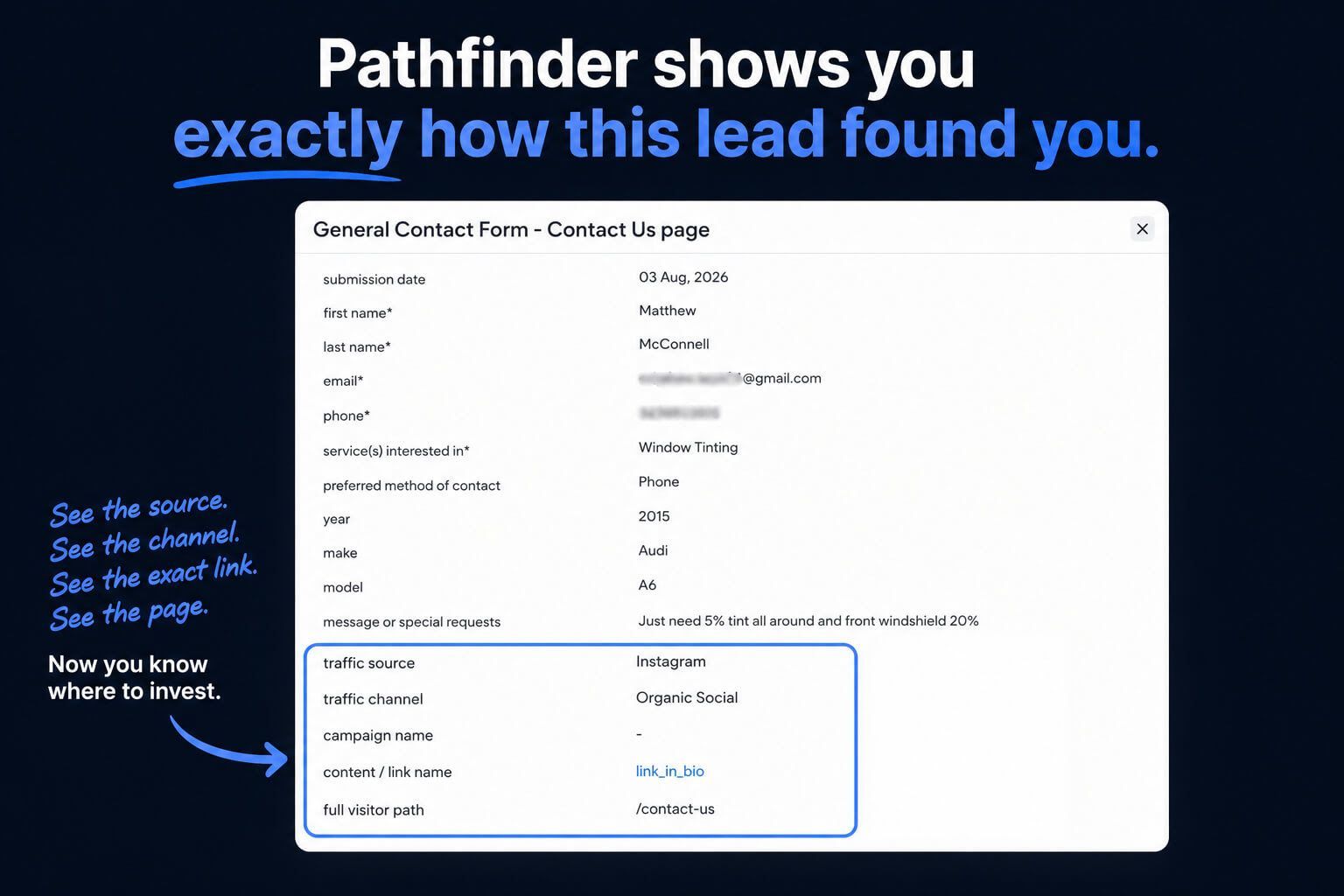
Example of Pathfinder Showing Your Customer's Path in Your Email Notification
Pathfinder is a lead-tracking tool that adds lead-source details to your website form submissions. When someone fills out a form on your site, Pathfinder shows you what brought them there in the first place, whether that was Google, Instagram, Facebook, your Google Business Profile, a paid ad, an email campaign, or the link in your bio.
It even shows the full path the visitor took through your website, page by page,
before they reached out.
In marketing terms, this is called lead attribution: connecting each lead back to the source, channel, and campaign that produced it. Most shop owners have never had this information tied directly to their leads. Pathfinder puts it right in front of you, every time a form comes in.
The Problem: Every Lead Shows Up Without a Map
Standard website forms only know what the customer types into them. They have no idea whether that person searched "ceramic coating near me," tapped your Instagram bio link, or clicked an ad. The form just captures the submission and sends it along.
That leaves a gap between your marketing and your results. You can see likes, views, and clicks inside each platform, but those numbers do not tell you which efforts actually turned into people asking for a quote.
That leaves a gap between your marketing and your results. You can see likes, views, and clicks inside each platform, but those numbers do not tell you which efforts actually turned into people asking for a quote.
Useful Insight
Much More Valuable Insight
How Pathfinder Maps the Trail In 5 Steps
Think of every lead as a traveler who found their way to your shop. Pathfinder records five parts of that journey and adds them to the bottom of your form notification, so the customer never sees them, but you always do.
🌲 The Trailhead: Traffic Source

The Traffic Source is where the journey started, such as Google, Instagram, Facebook, or another website that links to yours.
🏔️ The Trail Type: Traffic Channel

The Traffic Channel tells you how the visitor traveled from that source to your website. Did they find you naturally, or did they click something you paid for? Common channels include:
- Organic search: non-paid visits from search engines like Google, Bing, and Yahoo
- Paid search: visits from paid search ads, such as Google Ads
- Organic social: visits from posts, profiles, and bio links on sites like Instagram and Facebook
- Paid social: visits from paid social ads, such as Facebook and Instagram ads
- Email marketing: visits from clicks in your email campaigns
- Referral: visits from links clicked on other websites
- Direct traffic: visits with no referring source, usually someone typing your web address into their browser
📍 The Trail Marker: Campaign

When a visitor arrives through a tracked link or ad, the Campaign field names it. That might be an ad campaign like "Ceramic Coating Special" or a tagged link like the one on your Google Business Profile.
🪧 The Trail Sign: Content

Content gets even more specific, pointing to the exact link or piece of content the visitor clicked, such as the link in your Instagram bio.
🥾 The Footsteps: Full Visitor Path

This is where Pathfinder really earns its name. The Full Visitor Path shows every page the visitor walked through on your website before submitting the form. If a lead went from your home page to your ceramic coating page and then to your contact page, you will see that exact trail.
Where You Will See Your Pathfinder Data
You do not need to log into a new tool or learn a new dashboard. Pathfinder data shows up in two places you already use:
- Your form notification emails. The lead source details appear at the bottom of the email, right below the customer's information.
- Your client dashboard. Open any form response, and the same details are listed with the submission.
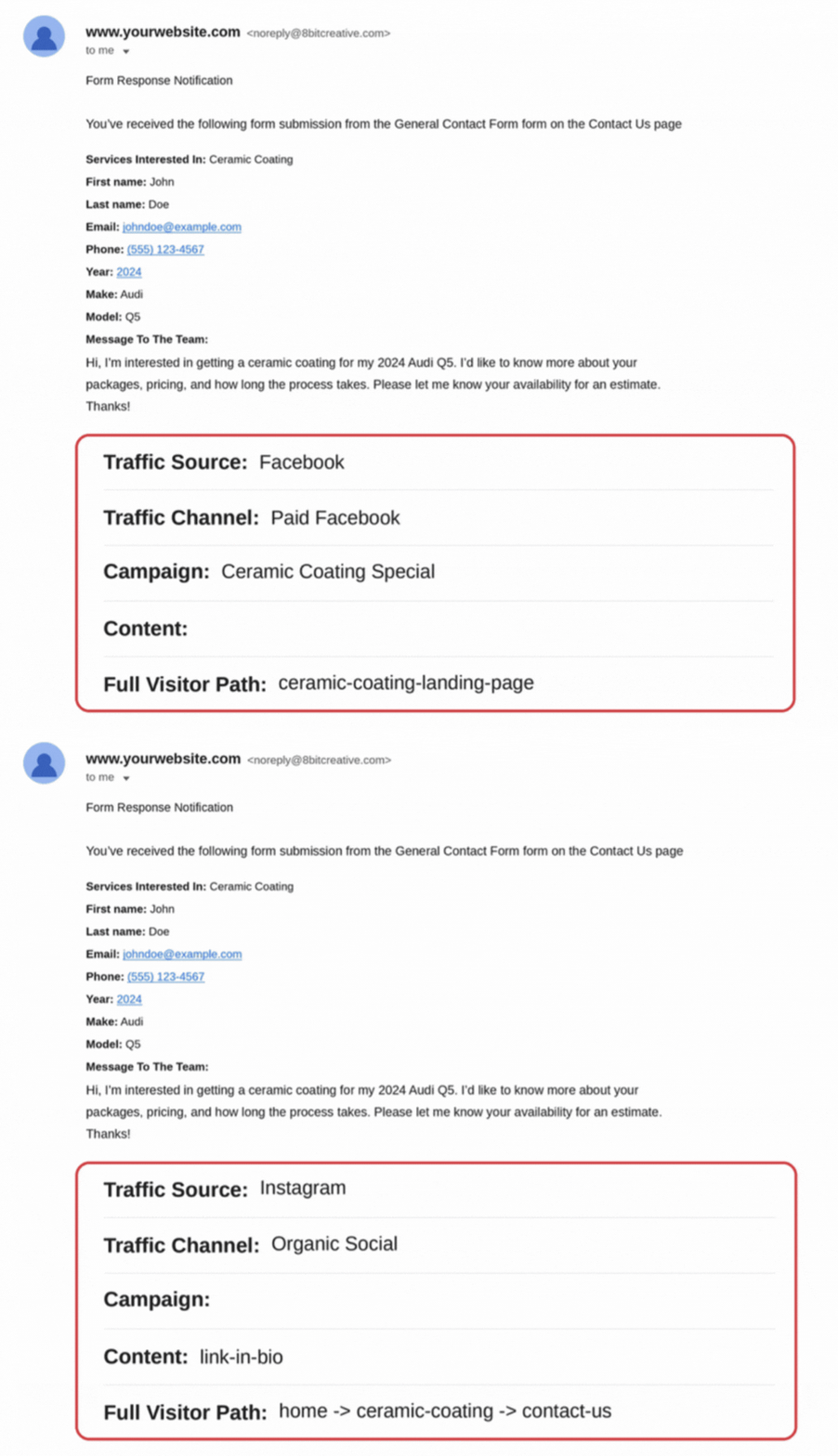
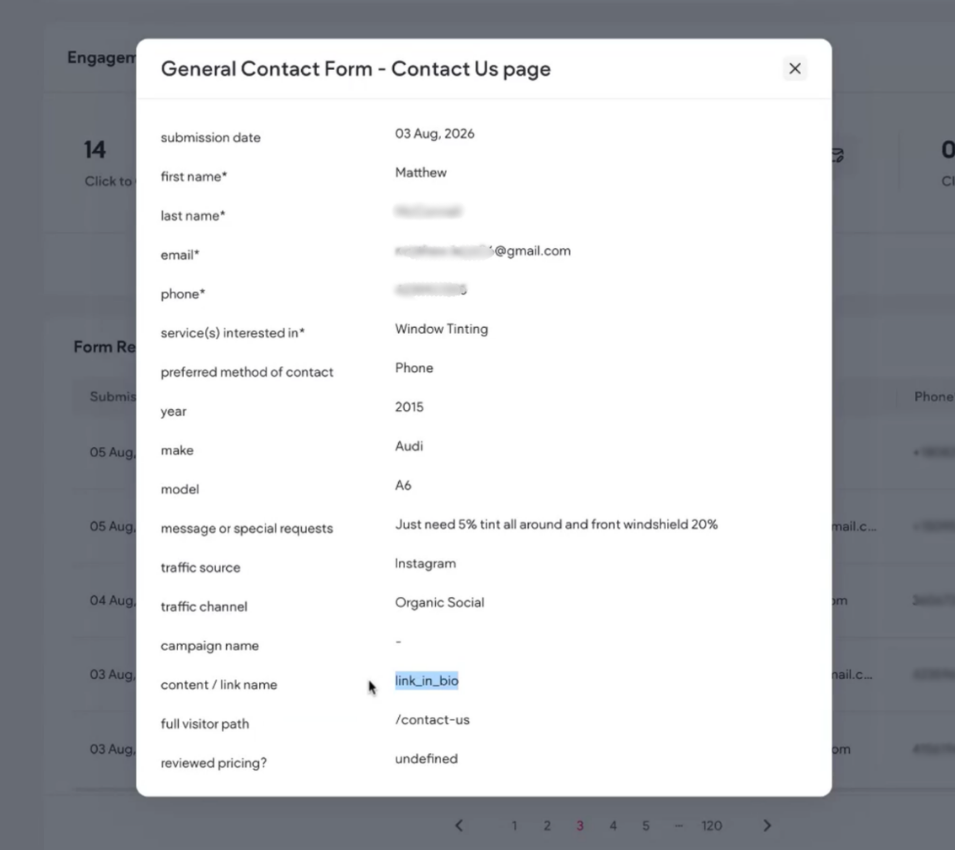
Email Notification Examples of Pathfinder (Left) & What Pathfinder Looks Like in Your Dashboard (Right)
The information appears the moment a new form is submitted. Pathfinder is installed across all of the forms on your website, so every lead gets tracked.
⚠️ Keep in mind that form submissions from before your install date will not include lead source details, since Pathfinder was not there yet to record the trail.
How to Read Your Lead Email
Here is what a Pathfinder lead email looks like. The top half is the same form notification you get today. The five lines in the box at the bottom are what Pathfinder adds.
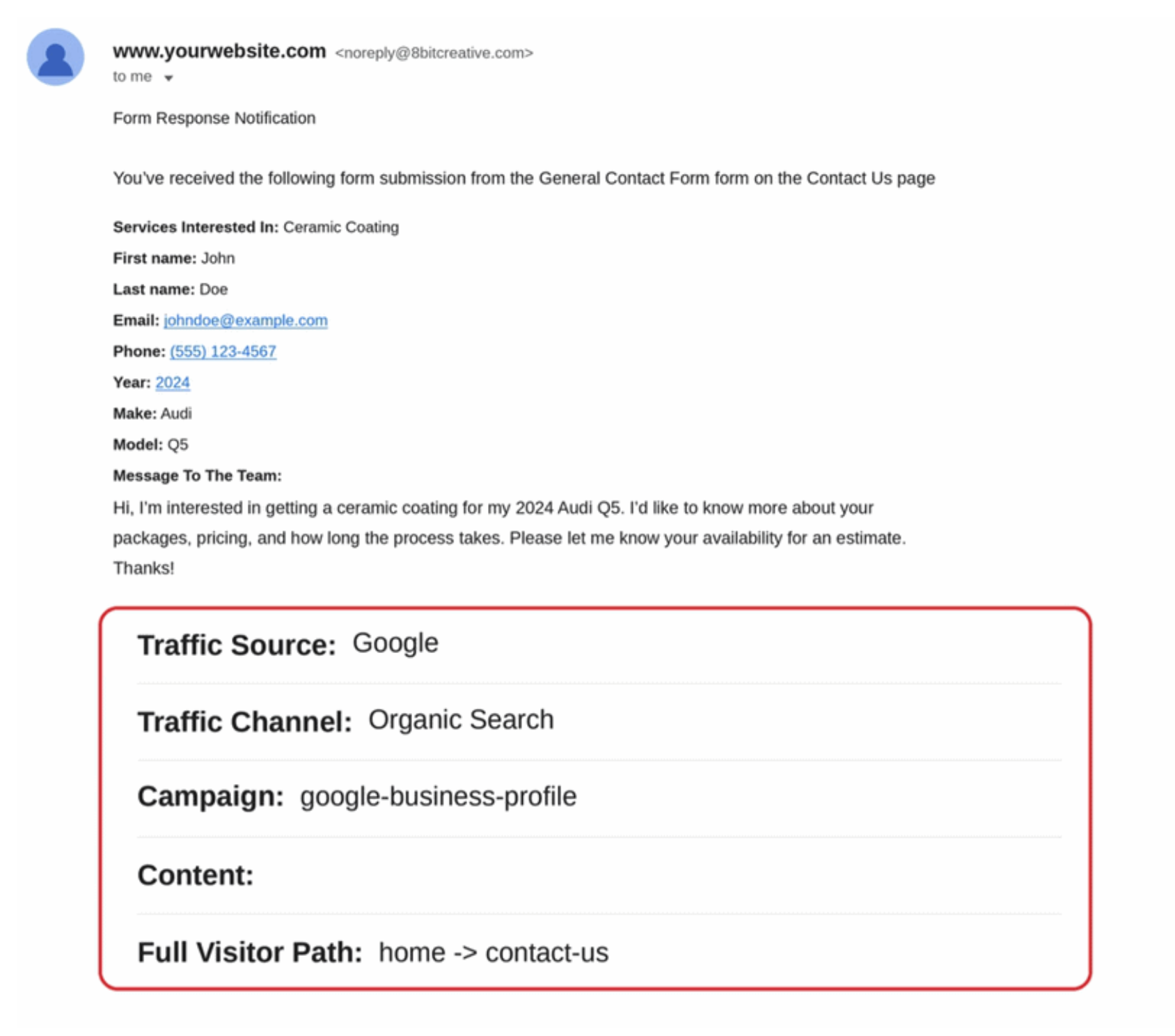
Email Notification Example of What Pathfinder Looks like (Referenced in Table Below)
| What You See in Your Email | What It Means |
|---|---|
| Traffic Source: Google | John's journey started on Google. |
| Traffic Channel: Organic Search | He found you naturally, without clicking an ad. |
| Campaign: google-business-profile | He clicked the website link on your Google Business Profile. |
| Content: (blank) | There was no more specific link to record, which is normal. |
| Full Visitor Path: home -> contact-us | He visited your home page, then went straight to your contact page and filled out the form. |
The Final Outcome
Now putting it all together, John searched on Google, found your Google Business Profile, clicked through to your website, and asked for a quote. Your Google listing just earned you a ceramic coating lead.
Following One Lead From Start to Finish
Every lead leaves a different trail. Here is how another lead from the sample email, one who found you on Instagram, made their way to your inbox. This example is proof your Instagram content and the link in your bio are turning followers into real leads.
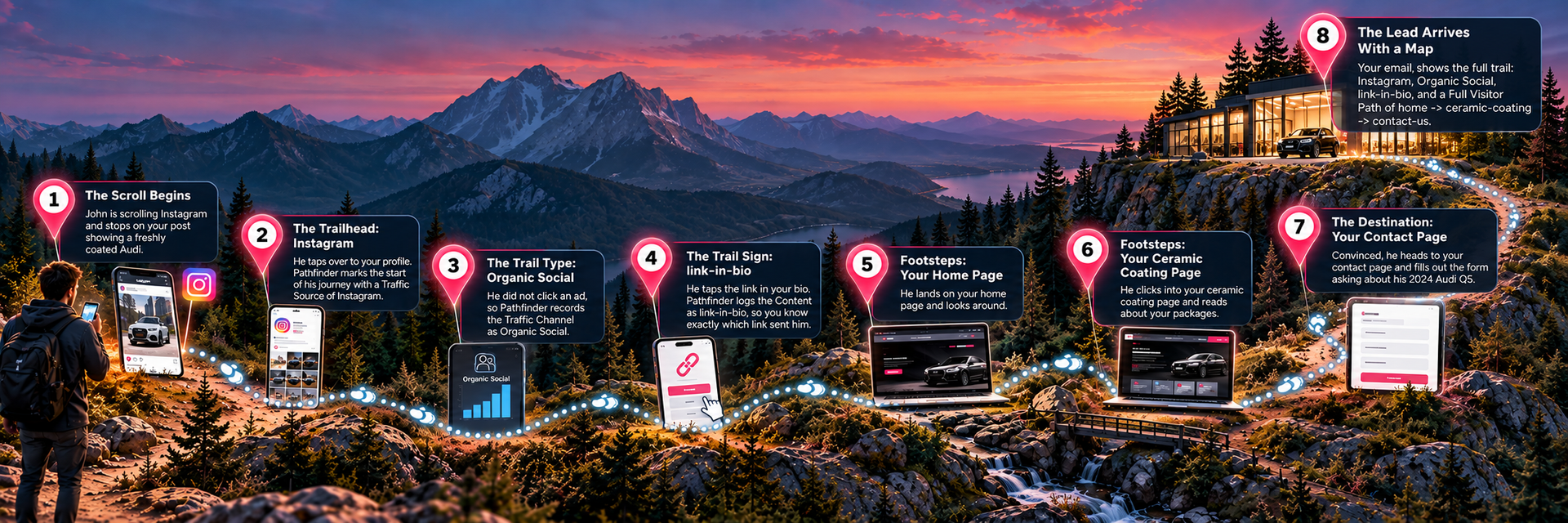
The User Journey With Pathfinder
The steps in the image above, written below:
- Start: The Scroll Begins — John is scrolling Instagram and stops on your post showing a freshly coated Audi.
- The Trailhead: Instagram — He taps over to your profile. Pathfinder marks the start of his journey with a Traffic Source of Instagram.
- The Trail Type: Organic Social — He did not click an ad, so Pathfinder records the Traffic Channel as Organic Social.
- The Trail Sign: link-in-bio — He taps the link in your bio. Pathfinder logs the Content as link-in-bio, so you know exactly which link sent him.
- Footsteps: Your Home Page — He lands on your home page and looks around.
- Footsteps: Your Ceramic Coating Page — He clicks into your ceramic coating page and reads about your packages.
- The Destination: Your Contact Page — Convinced, he heads to your contact page and fills out the form asking about his 2024 Audi Q5.
- The Lead Arrives With a Map
— Your email shows the full trail: Instagram, Organic Social, link-in-bio, and a Full Visitor Path of
home -> ceramic-coating -> contact-us
How Different Shops Use Pathfinder
Every shop runs a little differently, and Pathfinder fits into each one in its own way. Hover/click on each type to read how they can use Pathfinder to catapult their business.
What Pathfinder Is
Not
We want you to know exactly what you are getting, so here is what Pathfinder does not do:
- It is not a CRM. Pathfinder adds information to your form submissions; it does not manage your customer pipeline.
- It is not a replacement for Google Analytics. It focuses on the source of each lead, not full website traffic reporting.
- It does not report on every website visitor. It only adds details to the leads who fill out a form.
- It does not work on custom third-party forms. More on that below.
- It does
not add data to past leads. Only submissions after installation include lead source details.
Why Pathfinder is Worth the Investment
Make Every Marketing Dollar Work Harder
Just one ceramic coating, PPF, or window tint job can cover more than the monthly cost of Pathfinder. By helping you identify which marketing channels are generating real opportunities and which are falling short, Pathfinder gives you the insight to put more of your marketing budget where it can have the greatest impact.
Powerful Insights Without More Software
It costs far less than most outside attribution tools, works inside the website and dashboard you already use, and our team handles the entire setup. No software to learn, no code to install, and no new login to remember.
Turn Marketing Data Into Better Decisions
Most importantly, Pathfinder turns your marketing from a guessing game into a set of decisions backed by real data. You will know where your leads start, which path markers they follow, and which pages bring them to your door.
Pricing: Lock In On Our Limited-Time Deal
Pathfinder is a paid monthly upgrade. Here is how pricing works:
| When You Sign Up | Monthly Price | Details |
|---|---|---|
| Request by November 14, 2026 | $39.99 per month | Locked in at $39.99 for as long as you stay subscribed |
| On or after November 15, 2026 | $59.99 per month | Standard price |
| Cancel and return later | Current price when you rejoin | The $39.99 rate does not carry over after a cancellation |
Pathfinder is
month-to-month. You can cancel anytime, and you can choose to have it removed right away or at the end of your billing period. There are no refunds for the current billing period, and your past form submissions will keep the lead source details Pathfinder already captured.
NOTICE: If you are currently an RPM or SEO Partner, this is already included in on your plan and you do not have to purchase Pathfinder.
Is My Website Compatible?
Pathfinder works with forms built by the Detailers Roadmap team. It cannot be used with custom third-party forms, such as forms or booking tools embedded from another company.
Not sure which kind you have? Just reach out to
support@8bitcreative.com to ask, and our team will check your website and let you know if Pathfinder is a fit. If your site uses a custom form, we can switch it to a Detailers Roadmap form so Pathfinder can be installed.
*Switching adds about one business day to the installation timeline.
How to Get Pathfinder Added to Your Website
Getting started just takes a few minutes:
- Pay your invoice. Click here to be redirected to a Keap checkout form to pay your invoice. Remember, requests invoiced by November 14, 2026 are locked in at $39.99 per month for as long as you stay subscribed.
- We install Pathfinder. Once your invoice is paid, we will set up Pathfinder on your website within 3 business days and let you know when it is live. *If we have a major influx of requests, this may take a couple days longer, we highly appreciate your patience with our team.
- Follow the trail. Your next form submission will arrive with its lead source details included. Forward those emails to your marketing team or ads provider so they can put the data to work.
Notice: Form submissions received in your dashboard before Pathfinder has been installed will not have Pathfinder details attached, only submissions that have been received after installation.
If you have any questions or would like further clarification on this too, please reach out to
support@8bitcreative.com. We're happy to answer any questions you may have.
If you wish not to have this service, there is no further steps needed from you, and it will not be automatically added to your website or bill.
Frequently Asked Questions
Is Pathfinder free?
Pathfinder is a paid monthly upgrade. It is $39.99 per month for partners invoiced by November 14, 2026, and $59.99 per month after that.
Will Pathfinder show lead sources for my older leads?
Only form submissions received after Pathfinder is installed will include lead source details.
What happens if I cancel?
Billing stops, and Pathfinder is removed either right away or at the end of your paid period, whichever you choose. Your past submissions keep the details already captured. If you rejoin later, you will pay the current price.
Does Pathfinder work with booking tools from other companies?
Pathfinder only works with forms built by the Detailers Roadmap team, but we can switch your custom form to one of ours.
Want to see our other paid website updates that we have available for DR Partners?
Our full list of Paid Updates is on our
Website Updates
page.